Save time and space with Array Formulas
January 4, 2011 Leave a comment
Array Formulas represent one of the least used of Microsoft Excel’s many robust features. I’m not sure if most business people even know about them. But they should. And after this you will not be amongst the naive.
While a typical formula works on one cell at a time, array formulas provide a way to work with a range (or array) of data all at once, performing in one step what you would normally do in several.
Here’s a perfect example from a client:
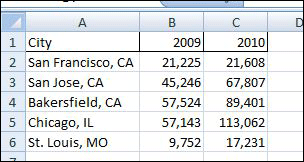
Figure 1: Sales Data for 2009 and 2010
The Company sells custom phone products at kiosks in malls across the United States. The owner has just closed the books on 2010 and wants to know how sales compared with 2009. Specifically, she’d like to know the average growth amongst the stores. She has collected the data shown in Figure 1, comparing 2009 versus 2010 sales data for all of her stores.
To get an average increase across all of the stores, most would do what? Well, most would probably add another column (D) to calculate the difference (Col. C-Col. B). Then take the average (using the average formula) of that new column. Not bad. But you can do all of that in one formula, an array formula:
=average(C2:C6-B2:B6)
Now, HERE IS THE TRICK:
Array formulas must be entered a little differently than regular formulas, so that Microsoft Excel doesn’t think you’re referring to individual cells. Instead of just hitting the <Enter> key, you must hold down the <Shift> <Ctrl> keys while hitting the <Enter> key. When done correctly, you will see fancy brackets around the entire formula:
{=average(C2:C6-B2:B6)}
And the cell will return the same figure you get with the other, longer method. Possibly as importantly, this method will also speed up the processing of the worksheet, something that can be a problem if your datasets get large or unwieldy.
| City | 2009 | 2010 |
| San Francisco, CA | 21,225 | 21,608 |
| San Jose, CA | 45,246 | 67,807 |
| Bakersfield, CA | 57,524 | 89,401 |
| Chicago, IL | 57,143 | 113,062 |
| St. Louis, MO | 9,752 | 17,231 |
 BobbyBluford.com