Named Ranges

If you’re like me, your spreadsheets can become rather unwieldy.  More often than not, a big reason is that I have to refer to a cell in several places.  While using absolute references and relative references appropriately is helpful, they don’t make things as easy as they could be.
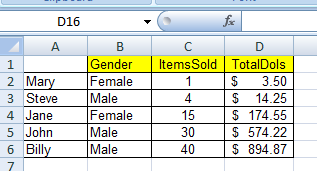
Figure 1: Sales Data Table

Say you’re working with the table on the right.  You have been asked to report the  Total males and total females, as well as the total items and dollars sold for each gender

Using the Countif() and Sumif() formulas, the most common ways would be:

for the total person for each gender:
=COUNTIF(B2:B6,”Male”) (the count for female is exactly the same)

for the sum of items sold and dollars collected:
=SUMIF(B2:B6,”Male”,C2:C6) (the sum for females and/or Total Dollars collected is exactly the same) Read more of this post

Starting to learn VBA

For years, I’d wanted to learn VBA (Visual Basic for Applications) so that I could leverage more of what Excel, Access, and the whole Microsoft Suite have to offer.  Heck, I also wanted to learn more cool tricks so I could impress my colleagues.  But, like with many things in the academic/learning world, unless you have something specific to relate to, a real-life purpose or application for the material that you are learning, the learned “stuff” resides in your brain only temporarily.  So, it wasn’t until such real-world reasons for using VBA presented themselves that I started to really dig in. Read more of this post

Getting the last day of the month

Here’s a common problem.  You need to create a column with the last day of a given month, converting another date in the row/record.  Below accomplishes the trick:

DATE(YEAR(B5),MONTH(B5)+1,1)-1

where the cell, B5, contains the date you are converting.

Your Algebra Teacher Was Right :(

Who knew that grumpy lady was right?  The one you used to make fun of.  The one you drew less than complimentary pictures of.  When your Algebra teach would say “You’re going to need this stuff later in life” you’d mumble to your buddy in the seat next to you “Get over yourself.”  Well, time to eat some crow, my friend.  Because she was right.

Case in point: Sales Tax Calculation when “Tax is Included”

It’s always convenient to sell products in round, easy to hand-over, currency denominations, right?  Of course.  Asking a customer to fork over a five, ten, or twenty dollar bill makes life a lot easier for everyone.  But how do you calculate the sales tax when “it’s included?”

After thinking through it for a minute, I figured it out.  I was impressed that I’d actually remembered.  And I was humbled by the fact that Miss Jacobson actually taught me something when I gave her nothing but flack.  Working through the problem on my white board helped:

Known variables: Total of Sale (example $20); Tax Rate (example 9.25%)
Unknown variable (x): Product or Service Price before Tax

Equation and Work:
Step 1: x + .0925x = $20
Step 2: x (1 + .0925) = $20
Step 3: x = $20/(1 + .0925)
Step 4: x = $20/1.0925 = $18.31
Step 5: Tax = $18.31 * .0925 = $1.69

So it looks like she was right after all.  I am going to need some of what I learned in school.

Proper() Function

I was reminded of a common problem in the workplace.  Cleaning up Data.  Whether it’s a mailing or contact list, employee records in a spreadsheet or from some other database, often times no steps are taken to ensure that the data is entered correctly.  So while “Mary Kay” takes her grammar and writing very seriously, “MARK JOHNSON” works in Oracle where he has to use all caps and is too lazy to switch when he’s multi-tasking and filling out his order form for that new camera he wants.  And “john doe” is a teenager and of the mindset that lower caps and shortening of words is how the texting world operates.

Proper() Function

Excel's Proper Function

So now you want to send out Christmas cards and don’t want the greeting to read “Dear MARK”.  What to do? Well, while I’d like to say I discovered some fancy formula to solve this common problem (I thought about using a combination of the Left, Find, and Len functions, it suddenly dawned on me that Excel already has a built-in function for this: Proper. Like Upper(), which changes all letters to capital and Lower() which makes them all lowercase, Proper() changes the case of letters in a word.  But, it makes them correct.  Meaning that the first letter (even in the middle initial or name) is capitalized, with the remaining letters lowercase.

It’s proper usage: Proper(TextToBeConverted)