21 Days

Last summer, my brother, my sister, and I, with our respective families in tow, converged on my father’s house for a week of rest and relaxation in sunny California. It was a much anticipated—and needed—family reunion. I hadn’t seen my sister, who lives in Indiana, in a couple of years. It had been even longer since I’d seen my brother, who resides in Washington. And we hadn’t all been together since my wedding almost a decade earlier. The week was nothing less than amazing. We ate. We drank. We laughed. Our kids got to spend quality time with their cousins, splashing in the pool and playing video games. And at moments, it felt like our mother, who passed away in 1998, was overseeing the whole event, still the loving matriarch of a closely knit family, bound together by affection, respect, and enough disagreements, arguments, and spats to rival any family.

But as anyone over the age of thirty with brothers or sisters can attest, spending time with your siblings as adults is surreal. At the most odd of moments, images of your childhood almost hijack your consciousness. You remember specific moments as children, both good and bad. You literally see your brothers and sisters—as they were years ago— in the eyes and actions of their children. (“She looks just like you” and “he acts like his daddy” were two of many refrains echoed over and over throughout the week.) And you wonder where all the time went. If you’re not careful, you’ll even find yourself holding back a tear or two. It’s okay— normal and healthy, even— to let those tears flow, but I’ll get to that in a later post. Read more of this post

YOY Comparison for Most Recent Days

Comparing Same Day Sales YOY

In my last post, Showing Activity for Most Recent Days, I showed you how to find the most recent date for which you have “totals” data.  We found that whether it’s support calls or sales made each day, being able to retrieve this information quickly and efficiently can be extremely helpful.   By using the ROUNDDOWN AND MAX functions, as well as the very powerful SUMPRODUCT,  we were able to create a quick summary of the most recent days’ activity. The obvious next question?  How do those days compare with the same time last year.  In other words, using the most recent data, how are things going compared to last year?

We already have the first several pieces of the puzzle, the current year’s sales information.  To compare the data to last year, we simply find the totals for the same dates in the previous year.  We can determine these dates these dates fairly easy by using the CONCATENATE formula, along with the popular and well known MONTH and YEAR formulas. Read more of this post

Is Stress Making You Fat? The Cortisol / Belly Fat Connection

Happy March! Spring is around the corner and so are tank tops and short shorts (for the guys…let’s hope not so short shorts). For those who have accepted the challenge of resisting soda and your diet vice for ten days, congratulations! (Please see last week’s post: https://bobbybluford.com/2011/02/22/welcome-julie/). The comments and conversations that followed my February 22nd post were both informative and entertaining, but what I enjoyed most was your honesty.

We all have vices, whether we acknowledge them or not. Lisa’s comment about wine being a “gateway drug” that leads her to make other poor diet choices is very poignant and I’m guessing relatable to many of us. Bobby’s suggestion to break habits with small successes is spot on. We must hold attainable goals. So, simply put, the “less everyday” approach, rather than the “cold turkey” approach keeps you trending in the right direction and builds your confidence and energy, which eventually translates into activity and the production of endorphins—the feel-good chemicals released in your brain to bring you a sense of well-being. Read more of this post

Showing Activity for Most Recent Days

I’m working on a dashboard for a company that sell tee shirts to high school sports programs.  They get their data from an online database which includes day and time of order as well as order amount. But, you could apply the same methodology to any data that is updated often, whether you are copying and pasting into Excel, importing from or linking to an Access database, or connecting to an ODBC data source. (Of course I didn’t use the company’s actual data; I used a cool trick to generate random dates and times for events for my sample data.)

At any given point, management of Acme SportsTees, Inc. would like to see the last 10 days of sales activity.  The trick to dashboards; and in my opinion, any process or task you are trying to automate; is removing from the process as much human involvement (thinking, typing, more thinking) as possible.  So, if you are able to connect directly to the data source, or at least reduce the actions required by the administrator to just copying and pasting, you will significantly reduce the opportunity for human error and a lot of headaches. Read more of this post

Generating Random Times for Events

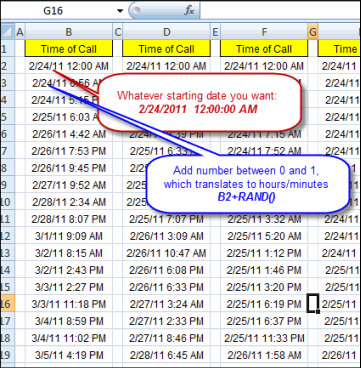
Generating Random Times for EventsIf you are ever in the need for sample data where the events (sales, support calls, etc.) occur several times throughout any given day, here is a neat little trick to accomplish that. One might think the RANDBETWEEN function, which generates a random integer between two numbers that you feed the function, would do the trick. Well, because RANDBETWEEN only returns whole numbers, the time of the day is always going to be at midnight.

To add increments that are less than one day, you would need to add numbers less than one (i.e. not whole numbers). For example adding 0.25 would take the time to 6 am; 0.5 to noon, and 0.75 6 pm. Luckily, adding a number less than one is easy. The RAND function, which generates a number between 0 and 1, does all of the work you.

To generate a list of random times, then, simply start with whatever date you wish in the first row of your data. All is needed in each cell afterward is the addition of Rand(). After adding Rand() to the previous cell, simply copy (or drag) the formula for as many entries as you wish. See attached for example. If, when you’ve finished the copying/dragging, you don’t see enough entries in each day (only 6 am, 2 pm, and 11:30 pm— 3 entries—for example), simply divide Rand() by 2 (or 3 or 4 or 5), to make the increment each time smaller. Pretty straightforward, huh?

Example: Generating Random Times and Dates