Kindle Evangelist

I hate to waste time.  Despise it.  Waiting in line somewhere, anywhere.  Driving (I mean riding) in the car.  Riding the bike in the gym.  Whenever there is a moment to learn something, I like to take advantage of it.  I used to carry two or three books with me everywhere I went.  I am always reading at least a couple- one self-help book, one business book, and usually a teaching manual or step-by-step reference book of some sort. Obviously carrying these books around was a pain.

Until I bought The Kindle. Read more of this post

Custom Number Format

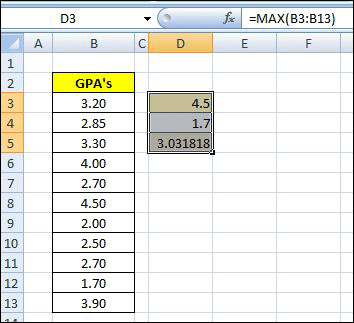
Figure 1: Write Functions max, min, and average

Do you ever want to include additional information inside of a cell that contains or calculates a number?  Here’s how.  Let’s pretend you have a classroom of students.  You have a list of their Semester Grade Point Averages and want to quickly summarize the class, looking at the highest, lowest, and average.

To accomplish it, you write the formulas to calculate the three figures.  The three functions you’ll use are:
max (), min (), and average () [See Figure 1: Write Functions: max, min, and average]

The next step is to reformat the cell, changing the default or current setting.  Right click on the cell, and select “Format Cells” toward the bottom of the drop-down window.  Once selected, the first tab of the format window, “Number”, will appear.  Choose the “Custom” Category at the bottom.

You’ll then see (to the right) a “Sample” section which shows the result of any custom function you write based on the selected cell’s current contents.  There are several predefined choices, but we’ll write our own.  We can, however, look at this list to get an idea of the different number and date characters (#,$,mm,yyyy) allowed. Read more of this post
Burning the Ships

In his acclaimed best seller, Think and Grow Rich, Napolean Hill tells a very motivating story.  So it goes, a great warrior was leading his troops against a much more powerful foe.  His army was significantly outnumbered by the opposing force, but avoiding confrontation was not an option.  He and his team set sail toward enemy territory and with every mile, he could feel the confidence of his army waning.  As they arrived, this lead warrior made a brave decision. Read more of this post

Trend and Growth Functions

Data can be analyzed in a lot of different ways.  Excel has dozens of tools and functions that make high-level statistical analysis not only possible, but in many cases fairly easy to use.

Researchers of all types (medicine, anthropology, sociology, entomology are a few of several fields) use statistics extensively.  Larger corporate companies also spend resources on analyzing, reporting, and making business decisions based on statistical analysis.

Read more of this post

The 20 Worst Drinks in America

Several days ago, I told you how reducing the number of calories you drink will go a long way towards helping you meet your fitness goals.  Well, today Men’s Health takes it one step further by giving you concrete examples of drinks TO AVOID.