A Mayonnaise Jar & Two Beers

Have you ever had a message delivered to you at just the right time in your life?  Well, a while ago, I was really struggling with balancing work,  my fitness, and my family.  And this story, sent to me by a very dear friend dealing with much more serious issues than those with which I was dealing, was just what I needed to remind me to keep things in perspective.

I still take a peak at it now and again to once again get grounded. Read more of this post

Eat This, Not That!

MensHealth.com has an umbrella of useful sites, including WomensHealth.com and EatThis.com.  Eat This, Not That! is a great resource for those looking to lose weight or just get leaner.  I encourage you to find every tool you can to make your life easier, to inspire and motivate you, and to help you grow every day.  Best of Luck!  And I’ll be checking in with you guys!

A thought (or two) on MLK Day

I’ll be 39 this year.  And although I am always hard on myself, thinking I should be further along in my life- more established professionally, more secure financially, among other things- the truth is I’ve done okay for myself.  And it’s okay for me to say that. (More on that in a later post).

But on this Monday, a day many of us appreciate only because it’s a day off, I did a little research.  Shamefully, I admit that I know a lot less about Dr. Martin Luther King, Jr. than I should.  A whole lot less.  So, after watching ESPN’s Town Hall Meeting Special on Martin Luther King and the Black Athlete, I started doing a little research.  Turns out, Dr. King was 39 when he died.  The same age I am now. Read more of this post

Kindle Evangelist

I hate to waste time.  Despise it.  Waiting in line somewhere, anywhere.  Driving (I mean riding) in the car.  Riding the bike in the gym.  Whenever there is a moment to learn something, I like to take advantage of it.  I used to carry two or three books with me everywhere I went.  I am always reading at least a couple- one self-help book, one business book, and usually a teaching manual or step-by-step reference book of some sort. Obviously carrying these books around was a pain.

Until I bought The Kindle. Read more of this post

Custom Number Format

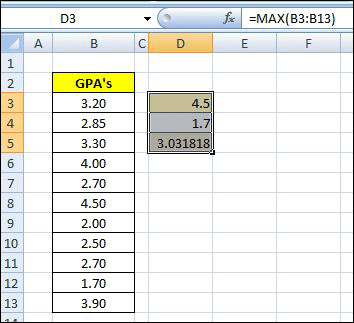
Figure 1: Write Functions max, min, and average

Do you ever want to include additional information inside of a cell that contains or calculates a number?  Here’s how.  Let’s pretend you have a classroom of students.  You have a list of their Semester Grade Point Averages and want to quickly summarize the class, looking at the highest, lowest, and average.

To accomplish it, you write the formulas to calculate the three figures.  The three functions you’ll use are:
max (), min (), and average () [See Figure 1: Write Functions: max, min, and average]

The next step is to reformat the cell, changing the default or current setting.  Right click on the cell, and select “Format Cells” toward the bottom of the drop-down window.  Once selected, the first tab of the format window, “Number”, will appear.  Choose the “Custom” Category at the bottom.

You’ll then see (to the right) a “Sample” section which shows the result of any custom function you write based on the selected cell’s current contents.  There are several predefined choices, but we’ll write our own.  We can, however, look at this list to get an idea of the different number and date characters (#,$,mm,yyyy) allowed. Read more of this post